
Ready for take-off?
Demo mode · Virtual credits
Enhance Your Chicken Rush
Swift Gameplay
Experience quick rounds with clutter-free screen visibility.
Gentle Alerts
Get non-intrusive round reminders to keep you on track.
Trustworthy Access
Download safely from the official operator source in your area.
Explore the Cutting-Edge Features of the Aviator3 App
Welcome to a deep dive into the Aviator3 app, an advanced platform designed to redefine your digital gaming experience. Through this page, we'll explore the various features offered by Aviator3, providing you with an in-depth understanding of its capabilities and enhancements. Our focus will be on its intuitive interface, robust security measures, comprehensive performance metrics, and a host of customizable options. This page is crafted to guide both beginners and advanced users in effectively unlocking the app's potential.
Whether you are a casual gamer or a dedicated enthusiast, the Aviator3 app aims to elevate your journey through ease of use and innovative features. Join us as we delve into each aspect of this revolutionary app, discovering how it seamlessly integrates into your lifestyle while ensuring maximum efficiency and security.
Navigating the Intuitive Interface of Aviator3

The Aviator3 app boasts an interface designed with the user in mind, ensuring seamless navigation across its features. This section will guide you through the visually engaging layout, highlighting how it simplifies access to tools and settings. The design prioritizes user engagement, fostering a more immersive gaming experience.
With minimal learning curves, the app accommodates both experienced users and newcomers alike. Its structured navigation bars, customizable dashboard, and comprehensive tooltips foster efficient gameplay management. Let's explore the aspects that make this interface a game-changer in digital app experiences.
Mastering Basic Navigation
Upon launching the Aviator3 app, users are greeted with a clean, organized main menu. Each tab clearly labels the core functionalities, allowing users to quickly locate tools and preferences. With strategically placed icons and hyperlinks, moving between sections becomes effortless.
The intuitive design caters to players requiring swift access to their favorite features without navigating through cumbersome menus. A quick tip — leverage the quick-action buttons on the home screen for frequent tasks, enhancing your overall usability and efficiency.
Customization for Personalized Use
Discover the potential of the Aviator3 app's customizable interface, allowing users to tailor layout and settings for an enhanced experience. Home screen widgets can be rearranged, resized or replaced, ensuring access to the most pertinent tools.
Users can select from several theme options and adjust display settings to suit their preference, making the interface not only functional but also visually appealing. These customizations ensure the app molds to user needs, fostering an individualized environment.
Key interface highlights include:
- User-friendly navigation
- Quick-access buttons
- Customizable dashboard layout
- Thematic displays
These features position the Aviator3 app as an accessible, engaging platform for all users.
Enhanced Security: Keeping Your Data Safe

In today's digital age, security becomes crucial. The Aviator3 app addresses these concerns with robust security frameworks designed to protect sensitive player data. From login credentials to gameplay history, comprehensive encryption protocols ensure confidentiality at every level.
Additionally, the app integrates multi-factor authentication systems, adding layers of protection against unauthorized access. This commitment to safety not only safeguards personal information but also enhances player trust and confidence when using the app.
Leveraging Encryption for Data Security
Encryption is at the heart of the Aviator3 app's security architecture, encoding data to prevent unauthorized alterations. This section explores how encryption protocols work to secure transactions, making sensitive data virtually unreadable to potential hackers.
Beyond standard encryption methods, the app adopts cutting-edge technologies that continuously update, ensuring alignment with emerging security threats and solutions. With these measures, Aviator3 sets a high standard for digital safety in the gaming world.
Integrating Multi-Factor Authentication
Multi-factor authentication further fortifies the Aviator3 app, requiring users to provide two or more verification factors to access their accounts. This ensures that even if credentials are compromised, unauthorized entry is prevented.
The app simplifies the authentication process, enabling users to choose preferred methods like fingerprint scanning or confirmation codes. Thus, players can maintain a balance between comprehensive security and user-friendly access.
| Feature | Description |
|---|---|
| Encryption | Protects sensitive data from unauthorized access. |
| Multi-factor Authentication | Requires additional verification factors for login. |
| Regular Software Updates | Addresses security vulnerabilities promptly. |
| Data Breach Alerts | Notifies users of any potential data threats. |
Key Metrics & Insights for Superior Performance Analysis

The Aviator3 app empowers players by providing key metrics and insights that facilitate in-depth performance analysis. Using sophisticated analytical tools, users can track their gameplay patterns, identifying strengths and potential areas for improvement.
With real-time statistics and intuitive data visualization, the app grants users the ability to make informed decisions about their strategies and gameplay. Such insights not only enhance gaming enjoyment but also encourage users to reach their desired outcomes.
Utilizing Real-Time Statistics
Real-time statistics allow users to access their gameplay performance instantly, delivering insights into win/loss ratios, average game durations, and other critical figures. These statistics help users stay informed of their progress throughout their gaming sessions.
The Aviator3 app presents this data through dynamic and interactive charts, enabling gamers to quickly interpret their results. This constant feedback mechanism plays a pivotal role in strategy adjustment and gaming optimization.
Graphing Performance Trends
Beyond numerics, visualizing performance trends through graphs can reveal interesting patterns in gameplay progress over time. The Aviator3 app simplifies this process by offering descriptive graphs and charts that highlight daily, weekly, or monthly trends.
These visualizations assist users in identifying anomalies and measuring improvement, turning raw data into actionable insights. It ensures gamers can strategically tweak their plans according to the trends, capitalizing on strengths and addressing weaknesses.
Customizing Your Aviator3 Experience for Maximum Efficiency
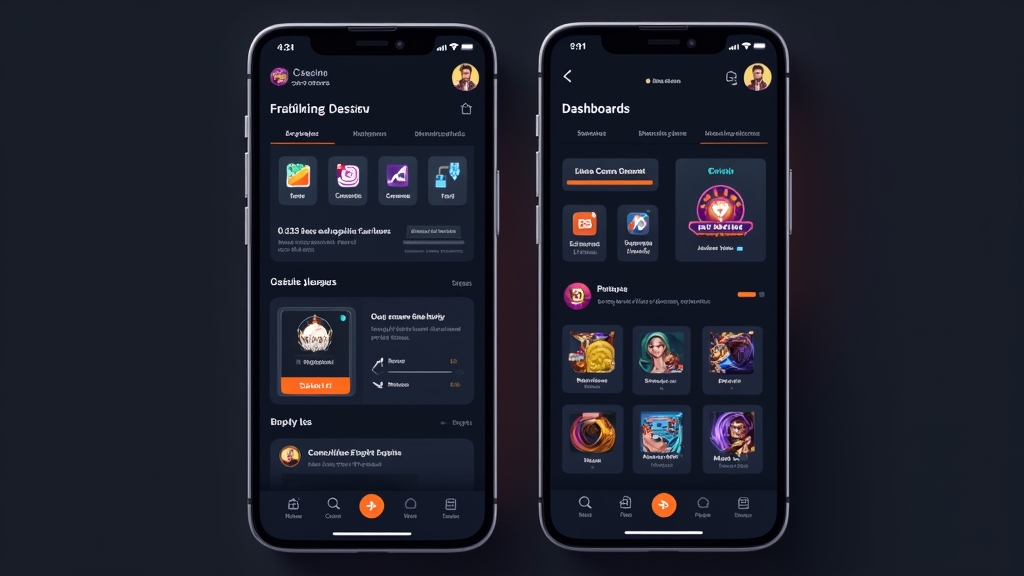
Customization is a hallmark of the Aviator3 app, allowing users to personalize their interface for maximum efficiency and productivity. By tailoring aesthetic preferences and tool layouts, users can focus on what truly matters — gameplay.
The app emphasizes user-directed configurations without compromising on functionality. From color themes to shortcut arrangements, every detail can be adjusted to suit individual preferences, driving engagement and satisfaction.
Setting Up a Personalized Dashboard
The Aviator3 app enables users to configure a personalized dashboard that displays their preferred functionalities, widgets, and data streams. This customization process ensures easy access to the most relevant tools and information in one view.
From adding shortcut icons to rearranging frequently-used utilities, users have the flexibility to design a dashboard that reflects their unique gaming style. This proactive approach to customization makes the app an adaptable tool for diverse user profiles.
Adjusting Notification Preferences
App notifications can sometimes be disruptive, but the Aviator3 app lets you decide which alerts are essential. Users can customize their notification preferences, receiving updates only on relevant developments like game results and promotional offers.
With adjustable notification settings, interruptions are minimized, allowing players to immerse themselves in their gaming experience without unnecessary disturbances, further optimizing game flow and convenience.
- Easy-to-use mobile app design ensures convenient play on the go.
- High compatibility across various devices offers accessibility to many users.
- Official app assures security when downloaded from legitimate sources.
- Potential limited features compared to desktop version should be considered.
- App downloads from non-official sources may pose security risks.
Utilizing Aviator3 Tools for Advanced Workflow Management

The Aviator3 app is replete with tools designed to enhance workflow management, allowing users to achieve superior efficiency and seamless task completion. From organizing game strategies to tracking performance, its features elevate users to a new level of productivity.
With its suite of task management options, the app supports both independent and collaborative play, facilitating effective communication and coordination among team members. These tools ensure smooth operation and strategic gameplay development for every user.
Strategic Task Management
At the heart of Aviator3’s functionality is strategic task management, designed to allow users to outline and pursue their goals efficiently. This feature streamlines planning and execution, making complex task breakdowns more transparent and manageable.
Empowered by Aviator3’s task management tools, users can set, track, and achieve targets without hassle. With a combination of reminders, checklists, and progress trackers, gamers can maintain momentum toward success without missing crucial steps.
Collaborative Play Features
Collaboration takes a front seat with Aviator3’s group management and communication tools, encouraging users to team up and strategize together. These functionalities nurture cooperative gameplay, enabling users to plan, discuss, and execute strategies collectively.
The collaborative play features are particularly beneficial during complex missions, where players rely on seamless communication and co-dependable strategies. Shared insights and experiences result in more efficient team performance and amplified game rewards.
Steps for optimizing Aviator3's workflow tools include:
- Setting up task priorities
- Customizing alerts for task deadlines
- Integrating with calendar apps
- Utilizing collaborative features
By diligently applying these steps, you can fully utilize Aviator3's advanced tools for an enhanced gaming workflow.
Integrating the Aviator3 App with Your Current Systems

Seamless integration with existing gaming systems is crucial for maximizing the advantages of the Aviator3 app. This section highlights the app's effortless compatibility with various platforms, ensuring smooth transitions.
By syncing with diverse systems, Aviator3 enhances accessibility and usability, offering gamers an uninterrupted experience regardless of which platforms they operate. This cohesiveness extends the app’s adaptability, making it a versatile addition to any gamer’s toolkit.
Cross-Platform Compatibility
A hallmark of the Aviator3 app is its ability to operate across various platforms, ranging from smartphones to desktops. This compatibility ensures ease of access regardless of location or device, promoting uninterrupted gameplay.
The app automatically adjusts to system specifications, delivering optimal performance without requiring external modifications. Users thus experience seamless transitions when switching between their different devices, removing boundaries to play.
Synchronization for Unified Experiences
Synchronization features in the Aviator3 app allow users to align their progress and settings across devices, promoting unified gameplay experiences. By maintaining consistency in app usage, players never miss a beat when they shift systems.
This synchronization ability fosters stability by enabling users to pick up where they left off, regardless of the device they are using at any given moment. The Aviator3 app's capacity for unified user experiences augments its appeal to gamers worldwide.
Troubleshooting Common Problems with Aviator3 App

Effective troubleshooting is essential for maintaining a smooth gaming experience. This section tackles several common issues users might encounter while utilizing the Aviator3 app, offering practical solutions to ensure uninterrupted enjoyment.
From connectivity challenges to performance glitches, our comprehensive guide will enable users to quickly address and resolve problems. By empowering users with knowledge, the app minimizes downtime, optimizing satisfaction and engagement.
Addressing Connectivity Issues
One typical problem users face concerns connectivity issues stemming from unstable networks or app-server communication failures. To resolve these issues, ensure that your device is connected to a reliable internet source and restart the app if needed.
At times, simple tweaks in network settings or using alternative connections can effectively restore app connectivity. Persistent problems may warrant consulting the app's customer support for further assistance.
Handling Performance Glitches
Performance glitches, such as freezing or slow response times, can affect your app engagement adversely. To alleviate these issues, regularly clear app cache and run app updates to maintain smooth operation.
Updating your device’s operating system might also alleviate constraints. Keeping both the app and your system firmware updated ensures compatibility and minimizes glitches, enhancing the overall functionality of the Aviator3 app.
Future Updates: What to Expect from the Aviator3 App in 2024

Anticipation surrounds the upcoming features in the 2024 version of the Aviator3 app, which promises to bring exciting enhancements and advanced functionalities. This section provides insights into the anticipated innovations and developments to expect in the future updates.
Plans for these updates signal a continued commitment to improving user experiences with streamlined features, optimized interfaces, and robust gaming capabilities. Aviator3 remains ahead of the curve, consistently focusing on customer-centric upgrades that meet evolving demands.
Introduction of New Analytical Tools
The 2024 update intends to introduce next-level analytical tools aimed at deepening performance evaluation. These tools promise enhanced AI-driven insights, allowing users to extract more detailed data than ever before.
These advancements care primarily for data-savvy users who benefit from nuanced analytics to sharpen their strategies. Expect standout features that translate complex data into intuitive, actionable insights, driving intelligent decision-making.
Enhanced Security Measures
Security measures continue to evolve, with 2024 bringing more sophisticated algorithms that further fortify data protection. The Aviator3 app stays committed to maintaining and enhancing the app’s reputable security standards.
Key areas of improvement include advanced encryption techniques and refined multi-factor authentication systems to provide deeper defenses against new and rising threats, ensuring continued peace of mind for its users.